The floor plan is the single most consequential document an organizer produces. It is your sales inventory, your safety blueprint, your traffic engineering plan, and your attendee experience map all at once. Long before the first pallet rolls off a truck, the floor plan determines how much revenue your show can generate, whether the fire marshal signs off, how easily exhibitors find their footprint, and whether attendees actually walk past every booth or cluster around the entrance and leave early.
This guide walks through how to design, sell, and manage a trade show floor plan the way experienced expo organizers do — from reading the venue's hard constraints to pricing premium real estate, to the operational workflow that turns a blank hall into a sold-out show. It is written for organizers who want a floor plan that maximizes revenue without compromising safety, flow, or the exhibitor experience.
What a good floor plan actually has to accomplish
Before drawing a single booth, it helps to be explicit about what the plan is for. A floor plan that only looks tidy on paper can still fail the show. A genuinely good plan serves several masters simultaneously, and the tension between them is exactly what makes floor planning a skill rather than a clerical task.
- Maximize sellable inventory — without violating code or crushing flow. Every square foot you can legally and comfortably sell is revenue.
- Distribute traffic evenly — so no exhibitor is stranded in a dead zone and every aisle gets foot traffic.
- Satisfy life-safety code — exits, aisle widths, and accessibility are non-negotiable and enforced by the venue and fire marshal.
- Make the experience legible — attendees should understand where they are and where to go; exhibitors should find their space instantly on move-in day.
- Reward your best customers — anchor tenants and sponsors expect placement that reflects their spend, and your pricing tiers should make that explicit.
Hold these five goals in mind as you work. Almost every decision below is a trade-off among them.
Read the venue before you draw anything
The biggest mistake new organizers make is designing the plan they want and then trying to force it into the hall. The venue dictates the plan, not the other way around. Get the official facility specifications and a scaled CAD or DWG floor plate from the venue's event services team. That document is the ground truth for everything that follows.
Fixed structures and obstructions
Halls are rarely empty rectangles. Note every column, the column grid spacing, ceiling height variations, permanent walls, escalators, restrooms, concession stands, and any low-clearance areas. Columns inside a booth are a problem you want to know about before you sell that space, not after an exhibitor complains. Map the floor load capacity too — heavy equipment, vehicles, and rigging all have weight limits you must respect.
Exits, egress, and the fire marshal
Life safety is where organizers have the least discretion. Most North American venues operate under NFPA 101 (Life Safety Code) and the venue's local fire codes, which the authority having jurisdiction (AHJ) — usually the fire marshal — enforces. You cannot block, narrow, or obstruct any exit, and the path to every exit must remain clear at the required width. Cross aisles must line up with exit doors so egress paths are continuous and obvious. Build the exit corridors first, then lay booths around them. The fire marshal typically reviews and stamps the plan before the show opens, and a rejected plan on move-in day is a catastrophe.
ADA and accessibility
Under the Americans with Disabilities Act, the show floor must be navigable by attendees using wheelchairs and mobility devices. That drives minimum aisle widths, ramp placement at any level changes, and accessible routes to all public areas including registration, restrooms, and food. Accessibility is not a feature you add at the end; it is a constraint that shapes aisle geometry from the start.
Loading docks, freight, and move-in logistics
Where the trucks come in determines how you stage the build. Identify the loading docks, freight doors, and marshalling yard. The general service contractor (GSC) needs to move freight from docks to booths efficiently, so your aisle layout doubles as a freight route during move-in and move-out. Large island booths and exhibitors with vehicles or heavy machinery should be positioned with a sensible path back to the docks. Plan the build sequence — typically back-of-hall and large structures first, then work toward the entrance.
Utilities under the floor
Power, water, drainage, compressed air, and data live in floor ports, trenches, or overhead. Pull the venue's utility grid and note where the floor boxes are. Exhibitors who need power (nearly all of them) or specialty services like water for a coffee bar or drainage for a demo should be placed where those services can actually reach without enormous and expensive cable or hose runs. A booth sold without considering utility access becomes an angry support ticket later.
The floor plan is not a layout exercise that happens to involve safety rules. It is a safety document that happens to generate revenue. Treat egress, accessibility, and load limits as the skeleton, and hang everything else on it.
Aisle width and traffic flow
Aisles are where the show lives. Get them wrong and you either choke the floor or waste sellable space. There is real tension here: every extra foot of aisle is a foot you cannot sell, but aisles that are too narrow create congestion, frustrate attendees, and can violate code.
Minimum versus comfortable widths
Your hard floor on aisle width is whatever the fire code and venue require — that is the legal minimum and it is not negotiable. But the legal minimum is rarely the right number for a busy show. Main aisles that carry the bulk of traffic should be noticeably wider than secondary aisles, because crowds, queues forming at popular booths, and people stopping to talk all eat into usable width. Cross aisles connect the main arteries to the exits and need to stay clear. A good rule of thumb: make your primary aisles generous, your secondary aisles adequate, and never let any aisle drop below code.
Engineering the walk
Attendees follow paths of least resistance and natural sightlines. Design the aisle grid so that the route from the main entrance naturally carries people through the entire floor rather than letting them loop back near the door. Techniques organizers use:
- Anchor placement — put marquee exhibitors or features at the far end so attendees walk the whole floor to reach them.
- Avoid dead ends — every aisle should connect to another; cul-de-sacs create dead zones that nobody wants to buy.
- Break up long runs — extremely long straight aisles feel like a slog; cross aisles give people permission to turn and explore.
- Watch the entrance pinch — the area right inside the doors floods at open and bottlenecks at close; keep it wide and avoid placing low-traffic-tolerant booths there.
Booth sizing and inventory
Your inventory is built from a standard module — almost universally the 10 ft by 10 ft booth (roughly 3 m by 3 m) — and everything larger is a multiple of it. Standardizing on a module keeps the grid clean, makes pricing predictable, and lets you reconfigure easily.
The standard booth types
- Inline (linear) booth — the basic 10x10 (or 10x20, 10x30) with neighbors on both sides and the back, open to one aisle. Display height is restricted, typically with a back-wall height limit and lower side rails so you don't block neighbors.
- Corner booth — an inline booth at the end of a row, open on two sides. More exposure, and usually sold at a premium over a mid-row inline.
- Peninsula booth — open on three aisles with one back wall, typically formed from a block of inline spaces (e.g., a 20x20). Strong visibility; the back wall usually has a center-line height restriction to protect the inline booth behind it.
- Island booth — surrounded by aisles on all four sides, with no shared walls. The premier format. Islands carry the loosest height restrictions and the highest prices, and they anchor the floor visually.
Building the inventory grid
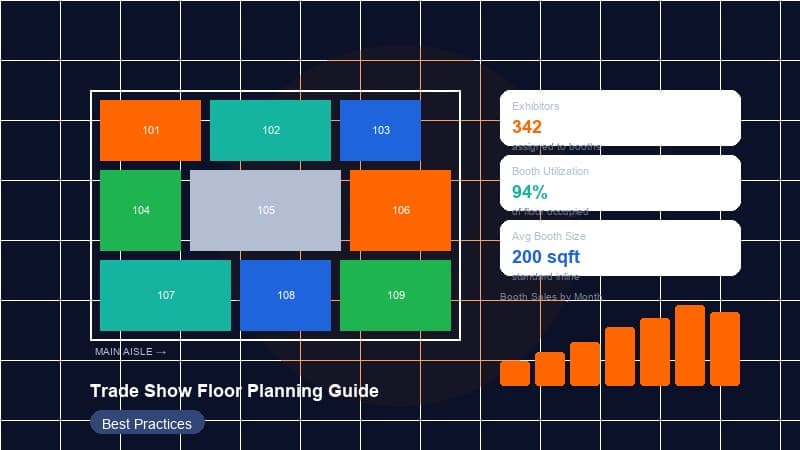
Lay out the standard 10x10 grid across the sellable area first, then carve out islands and peninsulas where you want anchor tenants. Decide your mix deliberately: a floor that is all small inlines feels uniform but caps your top-end pricing; a floor with too many large islands sacrifices booth count and the small-exhibitor segment that often fills out a show. Most successful shows offer a ladder — a healthy base of 10x10s and 10x20s, a tier of corners and peninsulas, and a handful of premium islands — so there is a right-sized, right-priced option for every type of exhibitor.
Premium versus standard placement: pricing to maximize revenue
Not all square footage is equal, and your pricing should say so loudly. Two identically sized booths can be worth very different amounts depending on where they sit, and capturing that difference is the core of floor-plan revenue strategy.
What makes a space premium
- Proximity to the entrance — high visibility as attendees arrive (balanced against the pinch-point caution above).
- Corner and end-cap exposure — open sides mean more eyes.
- Position on a main aisle — maximum foot traffic.
- Near anchors and features — booths beside a keynote stage, food court, or marquee exhibitor inherit that traffic.
- Islands — full visibility on all sides and design freedom.
Tiered pricing in practice
Define clear price tiers tied to placement, not just size. A common structure: a base rate per square foot for standard mid-row inline space, a premium uplift for corners, a higher tier for peninsulas and main-aisle frontage, and top-tier pricing for islands and entrance-adjacent positions. Sell the tiers transparently so exhibitors understand exactly what they are paying for. The goal is to capture the full value of your best real estate while keeping affordable options that fill the floor — an empty premium booth earns nothing, so price to sell out, not to leave trophies on the wall.
Sell the floor, not a spreadsheet
Exhibitors buy with their eyes. When they can see the live plan, watch desirable spaces get claimed, and visualize their own position relative to the entrance and anchors, urgency and willingness to pay both rise. A floor plan that shows price tiers in color, marks sold spaces in real time, and lets a buyer self-select their booth converts far better than a price list and a static map. Scarcity that the buyer can actually see is the most honest and most effective sales tool you have.
Anchor and sponsor placement
Your largest exhibitors and title sponsors are both customers and traffic infrastructure. Place them strategically and they pull attendees across the entire floor; place them poorly and you waste their drawing power.
- Anchor the corners and far reaches. Like department stores at the ends of a mall, big-name exhibitors at the perimeter and back of the hall draw attendees past everyone in between.
- Reserve before you sell. Block out anchor and sponsor footprints before general sales open so you are not trying to relocate a committed buyer later.
- Honor sponsorship tiers. If a sponsorship package promises premium placement or first pick, encode that in your sell sequence and reserved holds.
- Avoid clustering competitors. Spread direct competitors so each gets a fair share of traffic and the floor feels balanced rather than lopsided.
Food, lounges, and feature areas
Non-booth areas are not wasted space — they are traffic engineering tools. Food courts, seating lounges, charging stations, demo theaters, networking zones, and keynote stages all create destinations and dwell points that shape how the crowd moves.
Use them deliberately. Placing a food court or feature stage deep in the hall pulls traffic away from the entrance and past more booths. Lounges and charging areas near otherwise lower-traffic zones can rescue spaces that would be hard to sell. The booths immediately around a feature area inherit its traffic, so those spaces become a premium tier of their own — price them accordingly. Just keep feature areas clear of egress paths and make sure queues for food or popular demos don't spill into aisles and choke flow.
The build, sell, and manage workflow
A floor plan is not a one-time drawing; it is a living document that moves through three phases. Treating it that way keeps the show on track from concept to teardown.
1. Build
- Import the venue's scaled floor plate as your base layer.
- Lay in exits, cross aisles, and accessible routes first — the safety skeleton.
- Drop the standard booth grid, then carve islands, peninsulas, and feature areas.
- Tag every booth with its size, number, price tier, and any constraints (column, utility access, height limit).
- Reserve anchor and sponsor footprints.
- Submit to the venue and AHJ for safety review.
2. Sell
- Publish the live plan with sold, held, and available spaces clearly marked by color.
- Let exhibitors browse and ideally self-select their booth from the live map.
- Apply tiered pricing automatically based on booth attributes.
- Hold spaces during checkout so two buyers can't claim the same booth, and release expired holds automatically.
- Track the sell-through rate by tier to spot pricing that is too high (slow movers) or too low (instant sell-outs you could have charged more for).
3. Manage
- Assign booth numbers, manage waitlists, and process moves and upgrades.
- Track each booth's status — sold, paid, contracted, moved in.
- Handle inevitable changes: a cancellation reopens a premium space, a sponsor upgrades, a layout tweak satisfies the fire marshal.
- Export the final plan for the general service contractor and the venue.
Export is where the rubber meets the loading dock. Your GSC needs the plan in formats their crews can use: a PDF for distribution and printing, a DXF/DWG for CAD systems and on-floor marking, and a clean PNG or image for the printed show guide and signage. The ability to export the same source plan into all three without redrawing it saves hours and prevents the version-drift errors that come from maintaining separate files.
Common mistakes to avoid
- Designing before reading the venue. Forcing your preferred layout onto a hall with columns, low clearances, and inconvenient docks creates problems you'll pay for during move-in.
- Treating safety as a finishing step. Exits, aisle widths, and accessibility must be designed first, not retrofitted after the booths are placed.
- Creating dead zones. Cul-de-sac aisles, far corners with no anchor, and spaces behind features that nobody passes will not sell — fix the layout, don't discount your way out.
- Flat pricing. Charging the same for a back-corner inline and an entrance-facing island leaves significant revenue on the table.
- Selling the same booth twice. Without real-time holds and a single source of truth, double-bookings happen — and they damage exhibitor trust badly.
- Ignoring utility access. Selling a power-hungry exhibitor a space far from any floor box guarantees a costly, unhappy fix.
- Static plans that go stale. A PDF emailed in January doesn't reflect the floor in March; everyone ends up working from a different version.
Why collaborative digital floor plans beat emailing PDFs
For decades the floor plan workflow meant a CAD specialist, a stack of emailed PDFs, and a spreadsheet of who bought what. It works until it doesn't — and it stops working precisely when the show gets busy and the stakes get high.
The fundamental problem with the PDF-and-spreadsheet approach is that there is no single source of truth. The sales team's copy, the operations team's copy, the GSC's copy, and the exhibitor's copy all drift apart. Someone sells a booth that another person already promised. A layout change to satisfy the fire marshal never makes it into the version the printer used. Every reconciliation is manual, error-prone, and slow.
A live, collaborative floor plan solves this at the root. There is one plan, and everyone is looking at the same one in real time:
- Real-time multi-user collaboration — your sales lead, operations manager, and a contractor can work the same plan simultaneously and see each other's changes instantly, so there is never a question of which version is current.
- Live booth status — sold, held, and available update the moment something changes, killing double-bookings.
- Self-service booth selection — exhibitors pick their own space from the live plan, which speeds sales, captures the urgency of visible scarcity, and removes a manual step from your team.
- Drag-and-drop editing — reconfiguring the floor, moving a booth, or carving a new island takes seconds, not a round-trip to a CAD specialist.
- One-click export — generate the PDF, DXF, and PNG the venue and GSC need straight from the source plan, always in sync.
The result is faster sales cycles, zero double-bookings, fewer move-in surprises, and a plan the whole team — plus your contractors and exhibitors — can trust. A visual builder like the one in BoothHQ turns the floor plan from a static liability into the live engine of your show: you build it once, sell directly from it, manage every change in real time, and export exactly what your contractor needs without ever redrawing it.
Key takeaways
- The floor plan is a safety document and a revenue engine at the same time — design the egress, accessibility, and load skeleton first, then hang sellable inventory on it.
- Let the venue dictate the plan: map columns, exits, docks, and utilities before you draw a single booth.
- Aisle width is a trade-off between sellable space and flow; make main aisles generous, never drop below code, and engineer the walk so attendees cross the whole floor.
- Standardize on the 10x10 module and offer a full ladder of types — inline, corner, peninsula, island — so every exhibitor has a right-sized, right-priced option.
- Price by placement, not just size; capture the value of premium real estate while keeping affordable space to fill the floor.
- Use anchors, sponsors, and feature areas as traffic engineering tools to eliminate dead zones.
- Run the plan through a build → sell → manage workflow, and export cleanly to PDF, DXF, and PNG for your general service contractor.
- Replace emailed PDFs and reconciled spreadsheets with a single, live, collaborative plan — it ends double-bookings, speeds sales through self-service selection, and keeps every stakeholder on the same version.