Choosing event management software is one of the highest-leverage decisions an organizer makes. The right platform quietly removes friction from registration, booth sales, exhibitor coordination, and on-site logistics, freeing your team to focus on the experience itself. The wrong one creates spreadsheet workarounds, manual reconciliation, frustrated exhibitors, and data scattered across half a dozen tools that don't talk to each other.
There is no single "best" platform — only the best fit for your event's size, complexity, and growth plans. This guide gives you a vendor-neutral framework for evaluating your options, a checklist of features that genuinely matter, and a set of pointed questions to ask before you sign anything. Use it to separate marketing claims from operational reality.
Start by mapping your requirements, not by shopping for features
The most common mistake organizers make is opening a dozen vendor websites before they've defined what they actually need. Glossy feature lists are easy to fall in love with, and you'll end up paying for capabilities you never use while missing the one workflow that makes or breaks your event.
Before you look at a single product, write down how your event actually runs today. Be honest about the parts that hurt.
- Event type and format: A trade show with a sold exhibit floor has very different needs from a single-track conference or a multi-day hybrid summit. Identify which you are.
- Stakeholders: Attendees, exhibitors, sponsors, speakers, and your internal team all interact with the software differently. List what each group needs to do.
- Revenue streams: Ticketing, booth and floor-space sales, sponsorship packages, add-on purchases — your platform should handle whichever of these drive your budget.
- Current pain points: Where do you lose hours every cycle? Manual booth assignments, chasing exhibitor paperwork, reconciling payments, exporting data for reports?
- Scale: Number of attendees, number of exhibitors, number of events per year. A tool that's elegant at 200 attendees can buckle at 5,000.
Turn that inventory into a prioritized list: must-haves, nice-to-haves, and deal-breakers. This single document becomes your scoring rubric. When two vendors look equally impressive in a demo, your requirements list is what tells you which one actually fits.
All-in-one platforms vs. point solutions
One of the first strategic forks you'll hit is whether to buy a single integrated platform or assemble a stack of specialized tools — one for registration, another for the floor plan, a third for the exhibitor portal, and so on.
The case for point solutions
Best-of-breed tools tend to be deep in their niche. A dedicated ticketing platform may offer pricing and promotion features that broader products don't. If one specific function is the heart of your event and everything else is secondary, a specialist can be the right call. The trade-off is integration burden: you become responsible for making the pieces communicate, and your attendee or exhibitor data lives in multiple places.
The case for all-in-one
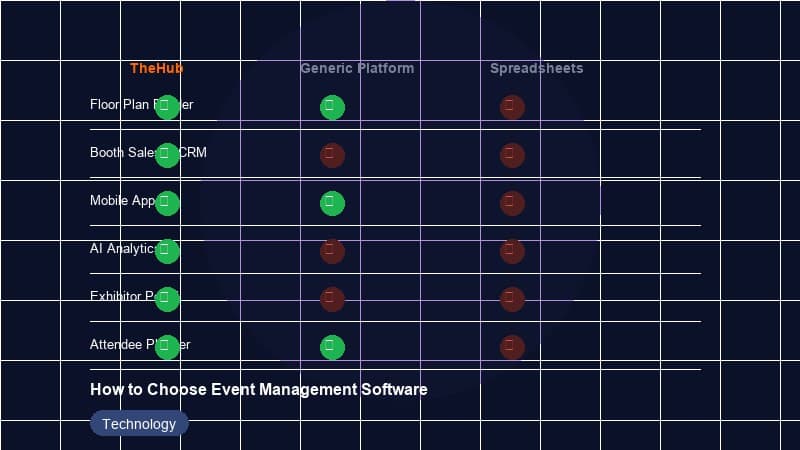
An integrated platform that handles registration, floor plans, booth and sponsorship sales, payments, the exhibitor portal, the mobile app, and reporting from one database removes the seams. There's one source of truth, one login for your team, one support relationship, and far less manual data shuffling. BoothHQ is built around this model — covering the full convention and trade-show lifecycle in a single system — and it's a reasonable fit when your event has a real exhibit floor and multiple revenue streams to coordinate.
That said, all-in-one is not automatically better. The honest question is whether the platform is genuinely strong across the modules you'll rely on, or strong in two and merely adequate in the rest.
The right architecture is the one that minimizes the work your team does between systems. Every manual export, re-key, or reconciliation is a recurring cost — and a recurring opportunity for error.
The must-have feature checklist
Regardless of which architecture you choose, these are the capabilities that separate a platform you can run an event on from one that merely demos well. Score each candidate against them.
Registration and ticketing
This is the front door. Look for customizable registration forms, multiple ticket types and tiers, group and bulk registration, discount and promo codes, waitlists, and a checkout flow that doesn't bleed conversions on mobile. Confirmation emails, badges, and check-in should flow naturally from the same records.
Interactive floor plan
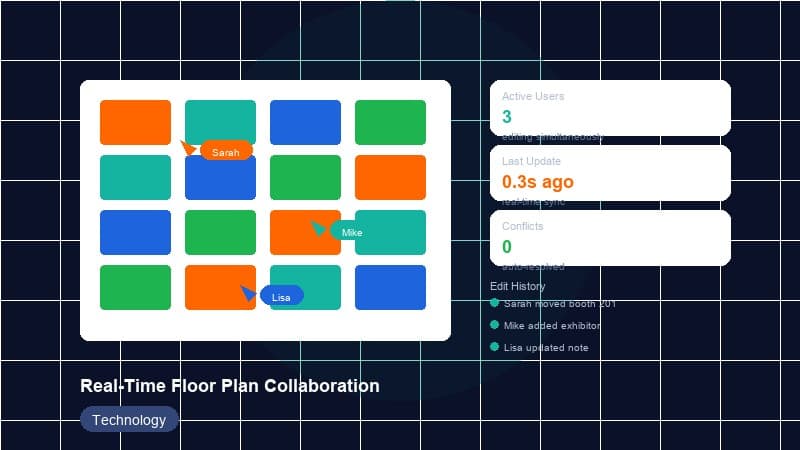
For any event with an exhibit hall, the floor plan is mission-critical. You want a visual, interactive map where booths can be defined, priced by tier or location, and reserved. The best implementations let exhibitors see availability and select their own space, with the plan updating in real time so two exhibitors can't claim the same spot.
Booth and sponsorship sales
Selling exhibit space and sponsorship packages should be a guided, self-service flow — not a chain of emails and PDF contracts. Look for configurable packages, tiered pricing, add-ons, contracts or terms acceptance, and the ability to track what's sold, reserved, and still available at a glance.
Integrated payments
Payment handling should be native, secure, and tied directly to whatever's being purchased — tickets, booths, or sponsorships. Confirm which payment processors are supported, how refunds and partial payments work, how payouts reach you, and whether the platform passes processing fees, marks them up, or charges its own per-transaction cut on top.
Exhibitor portal / resource center
The exhibitor experience is where many platforms quietly fall short. A proper exhibitor portal gives each exhibitor a self-service hub to manage their booth details, upload logos and assets, complete required forms, order services, access deadlines and documents, and communicate with your team. Done well, this eliminates the bulk of the back-and-forth that consumes an event team's time.
Attendee mobile app
An event app — agenda, maps, exhibitor directory, personalized schedules, notifications, networking — has become an expectation rather than a luxury at most professional events. Evaluate whether it's a real, polished experience or a thin afterthought, and whether content syncs automatically from your event data or has to be maintained separately.
Reporting and analytics
You can't improve what you can't measure. Look for real-time dashboards covering registration pace, revenue by stream, booth and sponsorship sell-through, check-in rates, and attendee engagement. Crucially, confirm you can export raw data — you should never be locked out of your own numbers.
Conference and call-for-papers tools
If your event includes a content program, consider session and speaker management, a call-for-papers (CFP) submission and review workflow, and agenda-building tools that feed directly into the attendee app and website.
Integrations, data ownership, and API access
No event platform lives in isolation. It needs to connect to your CRM, email marketing, accounting, and analytics tools. Before committing, map the systems you already use and confirm the platform integrates with them — natively, through a service like Zapier, or via API.
Then ask the questions vendors don't volunteer:
- Who owns the data? Your attendee, exhibitor, and financial records belong to you. Confirm this in writing.
- Can you export everything? Full data export should be available on demand, in standard formats, without a support ticket or a fee.
- Is there a documented API? A public, well-documented API future-proofs your investment. It lets you build custom integrations, sync data automatically, and avoid being trapped by a feature gap.
- What happens if you leave? Understand exactly how you'd extract your data and migrate away. A vendor confident in their product won't make this hard.
Data portability is the single best insurance policy against vendor lock-in. Treat any reluctance here as a red flag.
Scalability and multi-event portfolios
Buy for where you're going, not just where you are. If you run one event today but plan to add more — or grow this one — the platform needs to keep pace.
- Volume headroom: Will it handle 10x your current attendee and exhibitor count without performance issues or surprise pricing tiers?
- Multi-event management: Can you run several events from one account, reuse templates, and clone a prior event's setup as a starting point?
- Cross-event reporting: Can you see portfolio-level analytics — returning exhibitors, total revenue across events, year-over-year trends?
- Team and role management: As you grow, you'll need granular permissions so staff, contractors, and clients see only what they should.
A platform that forces a separate account or a painful re-setup for each new event will become a bottleneck the moment your portfolio expands.
Security and compliance
You're handling personal data and payment information, which makes security non-negotiable. You don't need to be a security expert, but you should ask for evidence.
- Payment security: Confirm PCI DSS compliance for payment handling, typically achieved through a reputable processor rather than the platform storing card data itself.
- Data privacy: If you serve attendees in regions covered by laws like GDPR or CCPA, confirm the platform supports compliance — consent capture, data deletion requests, and clear data-handling terms.
- Access controls: Role-based permissions, strong authentication, and an audit trail of who changed what.
- Reliability: Ask about uptime, backups, and what happens during a traffic spike on launch day — the worst possible time for the system to fall over.
Support and onboarding
Software is only as good as your ability to use it under pressure. The quality of support often matters more than any single feature, especially in the final week before doors open.
- Onboarding: How does the vendor get you up and running? Is there guided setup, data migration help, and training for your team?
- Support channels and hours: Email, chat, phone? What are the response-time commitments — and do they cover your event days, including evenings and weekends when shows actually happen?
- Self-service resources: Documentation, video tutorials, and a knowledge base let your team solve problems without waiting in a queue.
- Who you talk to: A dedicated contact who understands your event beats an anonymous ticket system, particularly for complex or high-stakes shows.
Ask current customers — not just the references the vendor hand-picks — what support is like when something breaks at 8 a.m. on show day.
Total cost of ownership and pricing models
Sticker price is rarely the real price. Map the full cost over a typical event cycle, including the line items that don't appear on the pricing page.
Common pricing models
- Flat subscription: A predictable annual or monthly fee. Easiest to budget; confirm what's included and what triggers an upgrade.
- Per-registration / per-attendee: Costs scale with your event. Fine for small events, but can become expensive fast at volume.
- Percentage of transactions: The platform takes a cut of ticket, booth, or sponsorship sales. Model this against your actual revenue — a few percentage points on a large gate can dwarf a subscription fee.
- Hybrid: A base fee plus per-transaction or per-attendee charges. Read the fine print carefully.
Hidden and recurring costs to surface
- Setup, onboarding, or implementation fees
- Payment processing fees layered on top of platform fees
- Charges for the mobile app, premium support, or additional users
- Overage fees when you exceed attendee or event limits
- The cost of integrations, or of the staff time to maintain a multi-tool stack
Build a simple spreadsheet that projects total cost for a realistic event at your current size, and again at your target size in two years. The cheapest option today may be the most expensive at scale.
A practical evaluation and demo checklist
Once you've narrowed to two or three contenders, run them through a structured evaluation rather than a passive sales demo. Drive the demo yourself.
- Bring your real scenario. Ask the vendor to demonstrate your workflow — your ticket types, your floor plan, your sponsorship tiers — not their canned showcase event.
- Get hands-on. Insist on a trial or sandbox account. Build a mock event. Walk through registration, reserve a booth, and process a test payment yourself.
- Test the weak modules. Most platforms are strong somewhere. Spend your time on the areas that worried you in the demo — usually the exhibitor portal or reporting.
- Score against your rubric. Return to your must-have / nice-to-have / deal-breaker list and rate each candidate honestly.
- Check references and reviews. Talk to organizers running events like yours, and read independent reviews for recurring complaints.
Questions to ask every vendor
- Which parts of this platform did you build yourselves, and which are third-party or recently acquired?
- Can you show me an event similar to mine running on the system today?
- What is the all-in cost for an event of my size, including every fee?
- How do I export all of my data, and who owns it?
- What does support look like on event day, and what are your response-time commitments?
- How do you handle a sudden traffic spike at on-sale launch?
- What's on your roadmap, and how often do you ship updates?
- Can I speak with two or three current customers I select, not just your references?
The way a vendor answers tough questions tells you as much as the answers themselves. Confidence and transparency are good signs; evasiveness is not.
Key takeaways
- Requirements before features. Document how your event runs and what hurts before you look at any product. Your prioritized requirements list is your scoring rubric.
- Choose the architecture that minimizes work between systems. All-in-one platforms reduce seams and data shuffling; point solutions offer depth. Pick based on where your event's complexity actually lives — and only go all-in-one if the platform is genuinely strong across the modules you'll lean on.
- Insist on data ownership and a real API. Full export on demand and a documented API are your best protection against lock-in.
- Buy for your growth, not just today. Confirm volume headroom, multi-event management, and portfolio-level reporting.
- Model the total cost. Account for transaction cuts, processing fees, add-ons, and overages — at both your current and future scale.
- Test it yourself. Run your real scenario in a sandbox, stress the weak modules, check independent references, and ask vendors the hard questions.
The right event management software should feel like it disappears into the background — handling the operational weight so your team can focus on delivering a great event. Take the time to evaluate carefully, and the platform you choose will pay for itself many times over in saved hours, cleaner data, and happier exhibitors and attendees.